Myzon

Books and more...

  • Bestselling Books
  • Reviews
  • Author Site
  • Calendars

Kindle FreeTime – The App that Helps Put Parents Mind at Ease

January 12, 2014 Karlene Stewart Leave a comment Blog

Kindle FreeTime, as discussed in my earlier post on Kindle Fire HD 8.9, helps parents to be at easy knowing that although their children are using a Tablet, they are restricted in what they can access.

Parental Controls

All Kindle Fire comes equipped with FreeTime already installed, and the app is FREE to use, except if you want unlimited service.  Any content that you have not added for a child, will be blocked. That means, your child will not have access to Youtube or Facebook for example, if you do not want your child to have access to that.

That should definitely make parents more comfortable, because it certainly is a concern once a child has access to the Internet. There will be warranted fears of if that child will access R-rated material, or be in communication with people they should not be communicating with.

FreeTime goes beyond access and also has controls to monitor the duration that a child is on the Kindle. You can set the time frame and have the device shut off once that time comes. Or alternatively, you can vary the duration of access to various things, for example, you can give a child unlimited access to books, while limiting time for video and games.

How Amazon goes about setting up the control is by using your child’s profile to create a customized experience. You will be asked to provide a name of your choice for the child’s screen name, and you need to provide information on the child’s gender and birth date, which is all subject to the Amazon.com Privacy Notice, and is used to customize your child’s Kindle FreeTime experience.

Kindle FreeTime Unlimited

As stated above, if you want unlimited service then the service would not be free. Kindle FreeTime Unlimited is based on a monthly subscription and on a per child, per family basis. From time to time Amazon does offer a free trial to eligible persons. But even if you don’t do a free trial, the subscription cost can be as low as $2.99 per month. You get a lower price as an Amazon Prime member, and higher if not.

I feel that this is a great deal because for this amount you are getting unlimited access to thousands of vidoes, games and book titles for children ages 3-8 years, and it is all within your control, as you get to pick the content.

It would be a good idea to sign up to be an Amazon Prime Member as you can save at least $2 each month on your subscription. Subscription for FreeTime Unlimited starts at around $4.99 for regular subscribers, and for up to four children you would pay around $9.99 each month. As an Amazon Prime member you would pay around $6.99 each month for four children.

Whatever you decide it would be a good and safe investment if you are considering purchasing a tablet for your child with extensive educational and entertainment possibilities. No need to worry about the risk of your child playing on the tablet for too long or venturing into online places they are not allowed to go.


Related articles
  • Review: Kindle FreeTime gives parents peace – Chicago Daily Herald
  • Review: Kindle FreeTime gives parents peace
  • Amazon adds education features and parental controls to Kindle FreeTime on Kindle Fire
  • Amazon adds educational goals for kids on Kindle Fire tablets
  • Kindle FreeTime: Parental controls and kid-friendly content
Enhanced by Zemanta
Tags: Amazon, Amazon Kindle, Amazon.com, Child, Facebook, kindle, kindle fire, Kindle Fire HD, Kindle FreeTime, Parent, Parental controls, Tablet, Tablet computer, Youtube |

Kindle Fire HD 8.9

January 4, 2014 Karlene Stewart 1 Comment Blog, featured

The Kindle Fire HD 8.9 is one of the hottest Kindle tablets right now. People are raving over it and giving it full 5 stars! With the amazing features, it’s no surprise why. Here’s just a few of the superb features:

  • Super light – only 13.2 ounces (13.5 ounces for the 4G version). It is 34% lighter than the previous generation.
  • Powerful Quad Core Processor – It provides 3x more processing power than the previous-generation Kindle Fire HD and, combined with 2GB of RAM, provides faster app launch times, quicker website load times, smoother multi-tasking and overall better performance.
  • Rear Facing Camera – features an 8MP rear-facing camera that allows for high-resolution photos and 1080p HD video. The rear camera includes an LED flash, Electronic Image Stabilization to remove hand jitters, a wide-aperture lens, and support for panorama and High Dynamic Range (HDR) imaging. The updated camera app also includes photo editing features and a new camera mode with filmstrip.
  • Battery Life – 12 hours of reading, surfing the web on Wi-Fi, watching video, or listening to music. When you’re just reading, it automatically powers down, extending battery life to 18 hours.
  • Live Support May Day – There’s a “Mayday” button that you can tap to be connected for free to an Amazon expert who can co-pilot you through any feature by drawing on your screen, walking you through how to do something yourself, or doing it for you, depending on what’s most convenient. Mayday is available 24×7, 365 days a year, and it’s free. Throughout the process, you will be able to see your Amazon Tech advisor live on your screen, but they won’t see you. They try to assist you in 15 seconds or less.
  • 4G Technology – it has the latest 4G LTE technology for ultra-fast mobile broadband, letting you connect to the internet, stream, and download at speeds even faster than Wi-Fi. It supports multiple bands ensuring that you always have the best and fastest possible connection on AT&T’s or Verizon’s expansive 4G LTE wireless network.
  • Faster Wi-Fi – Kindle Fire HD 8.9 resolves buffering, slow downloads and dropped connection issues by using state-of-the-art dual-band, dual-antenna Wi-Fi.

That’s just a few of the top of the line features available to you with Kindle Fire HD 8.9. With special offers, you can purchase your copy today for less than $230.

CC-KA._V357383824_

You can get free two-day shipping as an Amazon Prime member. Additionally, as a Prime member you can stream tens of thousands of Prime Instant Video titles at no additional cost, over half of which can be downloaded to the latest generation of Kindle Fire tablets.


Related articles

  • Get the best price for Kindle Fire HD 8.9″ Decalgirl Skin – ‘Create Your Own’ Big SALE
  • Amazon’s ‘record-setting’ holiday season shows Kindle Fire, Chromecast and Chromebooks dominate
  • Win a Kindle Fire!
  • Kindle Fire HDX 8.9″, HDX Display, Wi-Fi, 32

ABCmouse.com – Online Preschool Games – First Month Free – Click here!

Check out our new category featuring BIG savings each week!

Save 20% when you buy 6 or more Gooseberry Patch cookbooks

LabelDaddy.com Back to School Label Pack are here! Click to order!

Enhanced by Zemanta
Tags: Amazon Kindle, Canada, History, kindle, kindle fire, Kindle Fire HD, Kindle Fire HD 8.9, Tablet computer |

The Amazon Kindle: Why It Is a Popular e-book Reading Device

January 4, 2014 Karlene Stewart Leave a comment Blog

The Amazon Kindle is a popular e-book reading device.  Why is that?

A number of reasons. Firstly, it is portable.  Previously, users depended on their computers to read a digital book.  Even those with laptops were at a disadvantage, because they couldn’t curl up with a good book without a bulky laptop in the way.  The Amazon Kindle provides users with freedom.

Cover of "Kindle Wireless Reading Device,...

Secondly, there’s its weight.  The Amazon Kindle weighs on average 10.3 ounces.  This is less than most paperback books and all hardcover novels.  It caters comfortably to those who want to curl up with a blanket and a good book.  With the device being so light, this is absolutely achievable.

It is wireless.  The Amazon Kindle is equipped with Whispernet.  It uses Sprint’s data network to connect users to the Amazon Kindle Store on the go.  So, not only can owners purchase an e-book at the drop of the hat, they can do so without a computer and connecting cables.

There are many reasons why the Amazon Kindle is not only a popular e-book reader, but a hit.  As a writer, you can and should use this popularity to your advantage.  Write an e-book, register for a free Amazon.com account, visit the digital text platform, enter in your product description, covert your e-book to digital text, set your selling price, and publish.  Within 24 hours, your book should be listed for sale on Amazon.com.


Related articles
  • Amazon: Inspiring Kindle Books Only $2.99 or Less Today Only (Regularly $12.99-$17.50)
  • The Tech-pert: Is the Amazon Kindle Special Offers Worth the Price?


Enhanced by Zemanta
Tags: Amazon Kindle, Amazon.com, Business, E-book, kindle fire, Nook, Paperback, Publishing, Sprint |

Kindle Blows Away the Competition on Christmas Day

January 3, 2014 Karlene Stewart 1 Comment Blog

Mobile Analytics firm, Flurry Analytics, reported that Amazon activated 24 times more Kindles on Christmas Day than on any other day. This was a much higher number in activations than that of Apple, Samsung and Acer.

So far the trend is showing that people have been giving the Kindle Fire as gifts instead of getting it for themselves. But with the great features that they tend to have it would be a good idea for
people to start getting them for themselves as well.

To start with, Amazon Kindle tablets in general are priced at affordable rates in comparison to tablet devices offered by competitors, which would make sense as a factor that is influencing Kindle sales.

One of the latest tablets to be released is the Kindle Fire HDX, which was released by Amazon in fall of 2013. Among its features is the ability to access more than 300 channels of live television broadcast. This includes currently running and out-of-circulation favorites, as well as instant streaming availability to 5,000 on-demand videos when using the Kindle Fire HDX tablet at home. You can read more on this on Mobile Boom.

Additional features include ultra-fast web browsing, built-in Office Suite, and updated e-mail and calendar support for Gmail, Outlook, over 10,000 apps and more…

Related articles
  • As usual, Amazon’s Kindle blows away competition for tablet activations on Christmas

Microsoft Store for Students

Get 20% off your first order of brochures! Use coupon code NC20PB during checkout!

Become a Booking Agent

Learn Excel Quick!

Save 50% on Mixbook’s Biggest and Best Photo Books!
Join shareasale.com, Earn Cash!

Lose weight now!

Enhanced by Zemanta
Tags: Acer, Amazon, Amazon Kindle, Apple, Christmas, Flurry, kindle fire, Samsung |

Kindle Keyboard 3G – Carry over 3500 E-Books on the Go

December 31, 2013 Karlene Stewart Leave a comment Blog, Reviews

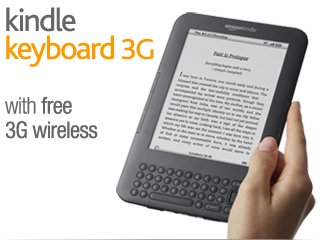
The Kindle Keyboard 3G is “smaller, lighter and faster”. At only 8.5 ounces and 1/3 of an inch thin, Kindle Keyboard is lighter than a paperback and thinner than a magazine.

It includes built-in Wi-Fi that allows you to connect to Wi-Fi hotspots anywhere, and even better, includes free Wi-Fi access at AT&T hotspots across the U.S.

slate-shasta-main-3g._SX320_SY240_CR0,0,0,0_V166813897_.png

It even has a Read to Me feature, which allows the Kindle Keyboard to read English newspapers, magazines, blogs, and books out loud to you, unless the book’s rights holder made that feature unavailable. You have the option to switch back and forth between reading and listening, and your spot is automatically saved. Pages automatically turn while the content is being read, so you can listen hands-free. You can even choose the gender voice you’d lead to hear read to you, and you can adjust the pace between fast and slow. This feature is great if you are cooking or doing other chores around the house, but want to read (or listen) to your book at the same time.

Speaking of listening, there are over 60,000 audible.com audio books that you have the option to download and listen to.

Other amazing features include a public library, where you have the option to check out a book from your local library and read on your Kindle or any Kindle app. And one of the best advantage I’d say is that you get to store up to 3,500 books on your Kindle Keyboard 3G.

Over 30,000 users on Amazon has given the Kindle Keyboard 3G a 4 or 5 star rating. You can see more about the Kindle Keyboard 3G in this video.

Related articles
  • kindle keyboard cover with light
  • On The Book Table and the Kindle
Enhanced by Zemanta
Tags: 3G, Amazon, Amazon Kindle, AT&T, Blog, Book, Kindle Keyboard 3G, wi-fi |

2014 Children’s Writers & Illustrators Market

December 29, 2013 Karlene Stewart Leave a comment Blog, Reviews

The 2014 Children’s Writers & Illustrators Market proved a very useful guide for me when researching the children’s market to find the most appropriate publisher for my new children’s picture book Meet The Imaginative Joe Dreamer. It’s a very comprehensive guide on publishers, their location, international markets and even includes details on who to address your cover letter to directly.

The price is quite affordable as well, especially when purchasing through Kindle. On Kindle you can get it for as low as $9.99, compared to the original price of $29.99. You save 67%.

It is a highly rated guide, not only by me. Of the 16 persons who rated it on Amazon, 15 persons gave it a 5 star rating, while the other person gave it a 4 star rating. I agree with the reviewers that it is truly an “incredible guide.”

51IqDv4Vq5L._SL160_PIsitb-sticker-arrow-dp,TopRight,12,-18_SH30_OU01_AA160_

Enhanced by Zemanta
Tags: Amazon, Amazon Kindle, Amazon.com, Art, Children's literature, Children's Market, Illustrators, kindle, Star (classification), Writers, Writers Resources |

Kindle Paper White 3G

December 29, 2013 Karlene Stewart Leave a comment Blog, featured, Reviews

Amazon calls the Kindle Paper White 3G “the best device for reading period.” Well I don’t know for sure yet since I haven’t bought the item, but the product review definitely has me curious enough to want to make a purchase. Some of the features include:

* Ability to be easily read in the sunlight with no screen glare.
* WiFi connectivity – you can connect anywhere.
* Battery life of 28 hours (of reading time) depending on the WiFi usage and screen brightness used.
* Touch screen control
* Easy page turning and access to the onboard dictionary, access to Wikipedia and X-Ray.
* Easy to access menu and setup was a breeze
* 25% faster response for loading books and page turning thanks to a faster microprocessor.
* Small, thin and highly portable
* Able to carry 1,100 books

There’s even kid-friendly features. You can create personalized profiles for kids, and give them access to titles from your collection of books. Kids are rewarded with achievement badges when they reach their goals. A progress report keeps parents updated on total time spent reading, number of words looked-up, badges earned and books read.

Over 2,000 persons have given this a 5 star rating on Amazon. Some have even called it revolutionary and said it is was worth the upgrade from the original Kindle Paper White. I totally recommend it and it’s definitely on my wish list.

41AanQY6xKL._AA160_

Related articles
  • I’m Dreaming of a Kindle Paper White 3G
  • Kindle Paperwhite Review: If Only Every E-Book Reader Was This Good
  • Amazon’s Electronics Gift of the Day Deal: $20 Off Kindle
  • Kindle Paperwhite
Enhanced by Zemanta
Tags: Amazon, Amazon Kindle, Blog, Book, kindle paperwhite 3G, Touchscreen, wi-fi, Wikipedia |

I’m Dreaming of a Kindle Paper White 3G

December 23, 2013 Karlene Stewart 1 Comment Blog

I absolutely love my Kindle 6 E Ink Wi-Fi, which of course is small, light and perfect for reading, but lately I find my eyes wandering over to the Kindle Paper White 3G.

Maybe it’s how the ads dazzle, and considering that blue is my favourite colour, makes sense that the Amazon banner ads would appeal to me. I think the price is still pretty decent, but it is in fact more than twice the amount I paid for my Kindle 6 E Ink, so maybe it will have to remain on my wish list. Plus I definitely don’t need two kindles. But the ads surely make me go googoo gaga :-).

Although there’s an obvious price difference here, $69 versus $179, it has definitely peaked my curiosity to find out what’s so extra special about the Paper White 3G besides the appealing built-in light.

Well, as it turns out this new version has touch screen, processes 25% faster, has some smart look up dictionary features, which is a highly rated feature for children. Another feature for kids is called ‘FreeTime’ whereby you can personalize profiles for your children and give them access to your collection of books. Kids are rewarded with badges when they reach their goals. A progress report keeps parents updated on total time spent reading, number of words looked-up, badges earned and books read.

You can tap or highlight words and get instant translations into other languages, the battery lasts up to eight weeks. The screen is whiter and text is darker so it’s clearer, crisper text and obviously easier on the eyes to read. And with the next-gen built in front light you can read in the dark, unlike the Kindle 6 E Ink.

You can share with your friends on goodreads, even flip through pages and chapters and skip to the end for a sneak peak without losing the place you’re at in another section of the book.

If you have no wi-Fi set up at home, then the Paper White 3G is a good option because it comes with built-in free 3G connectivity, which uses the same wireless signals that cell phones use. You can download books anywhere without needing to be in a Wi-Fi hotspot.

It all sounds amazing. The reviews on it are also pretty good. Over 2,000 persons have given it a 5 star rating on Amazon. Unfortunately I won’t be upgrading to it at this time, but I’m definitely dreaming of it.

Related articles
  • Kindle Paperwhite Review: If Only Every E-Book Reader Was This Good
  • Kindle Magazine
  • Amazon adds education features and parental controls to Kindle FreeTime on Kindle Fire
Enhanced by Zemanta
Tags: 3G, Amazon, Amazon Kindle, Book, eInk, Hotspots, kindle paperwhite 3G, Shopping, wi-fi |

Carried Away by Kindle Deals

December 21, 2013 Karlene Stewart Leave a comment Blog

I’m one of those people who will end up buying a book even if it was never my initial intention to do so, just for the sake of taking advantage of a great deal.

Great deal for me is not just based on the percentage, but what the final value works out to. So for example, if a 50% off works out to the end product cost being $200, then I may still walk away from the deal even though I would save 50%. However, if after the sale I’m spending between just $1 and $5 then to me that is just amazing and I find it extremely hard to walk away.

Amazon sent me an email about some “big deal” so naturally I clicked the link to learn more. Seeing 85% off definitely peaked my interest, but then seeing exactly how much 85% off worked out to definitely got me excited.

Some people mistake deals for rip-offs, but seriously, how can you go wrong on books, especially on eBooks?

Yes of course we’ve been there where we’ve bought an inexpensive bag, shirt or shoes, then regretted it later when it’s falling apart, and then the old adage kicks in, “you get what you pay for.” Well, when I see a book that’s on a best seller list with an original cost of almost $25 being sold for under $4 and with a title that’s very catchy and interesting I’m absolutely not walking away. And as if this isn’t a bargain in and of itself, you additionally get the option of taking a look inside. Now what more could you ask for?

As soon as I’m done writing this blog I plan to get my hands on a kindle copy of Mind Over Medicine: Scientific Proof That You Can Heal Yourself. Not only is it a huge deal in savings, but it’s also a topic I’m deeply interested in. So it’s a win win situation. Especially now that I am having this cold that makes me so miserable, I would be totally happy to hear of any legal, ethical way in which I can be better without depending on medicine. So I’d love to find out what this author has to say.

I guess my only worry is that these kindle deals are always so good that I keep spending and spending. In fact various online articles have been reporting over the last three years that Kindle eBook sales have overtaken Amazon print sales. I am definitely evidence to that fact. Never before had I bought books in such quick succession. So I’ll have to watch my purse a lot more closely now and make sure I don’t get too carried away on all these super fabulous kindle deals.


Related articles
  • Amazon Has Over 20 Million Kindles in Consumer Hands
  • The Tech-pert: Score Great e-Book Prices with Amazon Kindle Daily Deal
Enhanced by Zemanta
Tags: Amazon, Amazon Kindle, books, Business, E-book, Publishing, Publishing and Printing, Shopping |

Kindle Magazine

December 16, 2013 Karlene Stewart Leave a comment Blog

For all newbies to kindle and e-books, you may be happy to find out that there’s also Kindle Magazine. That’s right. You can get your favourite magazines via Kindle. And right now is a superb time to get these magazines, especially on Amazon, as you can save as much as over 60% with the sale they’re offering right now.

Apparently you can even try some of the magazines free for 30 days, and after that it’s up to you whether you wish to renew the subscription or not.

As a treat for the kids there’s also Kindle Magazines for kids such as Click Magazine. I love Click because I think it’s such a fun and exciting way to inform kids about nature and their environment, while at the same time getting them acclimatized to a lifestyle of reading.

Either way, whether it’s something for you or something for your kids, you should definitely check out these amazing Kindle Deals.


Enhanced by Zemanta
Tags: Amazon, Amazon Kindle, Apple, E-book, kindle fire, Magazines and E-zines, Online shopping, Shopping |

Kindle 6 E Ink Display, Wi-Fi

December 11, 2013 Karlene Stewart 1 Comment Blog, Reviews

Recently I was all excited about my Kindle 6 E Ink Display, Wi-Fi, which was actually the lowest priced Kindle I saw on Amazon, only to now see that one was advertised for even lower – $55. Wow, amazing, and it appears to be the same one I have. But anyway, no regrets. I’m still happy I made the purchase when I did. I’ve purchased at least 10 e-books now for no more than $2 on my kindle. I have even had the liberty of purchasing books that are not yet published, for only $1.99. How sweet is that.

I love how easy it is on the eyes too. There is no bright glare, so in a sense it’s like reading from a print book. It’s pretty comfortable to read out in the sun too. The text is really nice too, very crisp and clear. This is because Kindle uses ink particles and hand-built fonts to create text that give a similar look to that of print. You might ask, so what’s the difference with just getting the print books? Well, the Kindle will be a whole lot lighter than the print book and you can store hundreds of books all at once on your Kindle.

Another excellent thing, unlike regular tablets, I don’t have to constantly charge the Kindle, as it has one full month of battery life, so basically I only need to charge it up once every month.Totally loving my Kindle 6 E Ink Display, Wi-Fi!


Related articles
  • Kindle Wi-Fi, 6″ Display $55.20 SHIPPED!
  • New Kindle, Wi-Fi, 6″ E Ink Display
  • Kindle Sale – 20% off on Amazon – as low as $55.20
  • Kindle 6″ E Ink Display Wifi E Reader


Enhanced by Zemanta
Tags: Amazon, Amazon Kindle, Book, books, budget, deals, kindle, kindle fire, Kindle Fire HD, one click, Reading (process), Shopping, wi-fi |

Recent Posts

  • Training: A Must When Building Your Author Platform
  • Print Books are Still Very Much Alive
  • HAPPY ANIMALS
  • Praise For Meet the Imaginative Joe Dreamer
  • Journey of Miracles – Through a Young Girl’s Eyes

Recent Comments

  • Journey of Miracles - Through a Young Girl's Eyes - Myzon on Reverse and Reset – Revising and Rebranding My Books
  • Kindle FreeTime - The App that Helps Put Parents Mind at Ease | Myzon on Kindle Fire HD 8.9
  • ravinder tulsiani books on Kindle Blows Away the Competition on Christmas Day
  • Kindle Paper White 3G | Myzon on I’m Dreaming of a Kindle Paper White 3G
  • Karlene Stewart on Kindle 6 E Ink Display, Wi-Fi

Archives

  • May 2017
  • April 2017
  • February 2017
  • January 2017
  • December 2016
  • August 2014
  • January 2014
  • December 2013

Categories

  • Blog
  • featured
  • Promotions
  • Reviews

Meta

  • Log in
  • Entries feed
  • Comments feed
  • WordPress.org

Pages

  • About You Can Rise Up!
  • Author
    • About Let My Soul Bare
    • Buy the Books
  • Bestselling Books
  • Books
    • Best Deals in Books
    • Best Selling Children’s Books
    • Biographies and Memoirs
    • Children’s Science Fiction and Fantasy
    • Christian Books
    • Cook Books
    • Politics and Religion
  • Calendars
  • Copyright
  • Disclaimer
  • Kindle Paper white 3G
  • Magazines
    • Best Health and Fitness Magazines
  • Privacy Policy
  • Promotions
  • Related RSS Plugin
  • Reviews
  • Terms and Conditions
  • WELCOME

Archives

  • May 2017
  • April 2017
  • February 2017
  • January 2017
  • December 2016
  • August 2014
  • January 2014
  • December 2013

Categories

  • Blog (26)
  • featured (5)
  • Promotions (3)
  • Reviews (7)

WordPress

  • Log in
  • WordPress

CyberChimps WordPress Themes

© Karlene Stewart